Macintosh: Spotlight can do math

Did you know that Spotlight, on your Macintosh can do math? Many times it is quicker than bringing up your calculator.
Remember:
- + = add
- – = subtract
- / = divide
- * = multiply
- Use parentheses for formulas
- Click the magnifying glass Spotlight icon in the upper right corner of your Mac or use the default keyboard command: Command Space ( Space)
- Type in your notation and you’ll see the result below in real time. 🙂
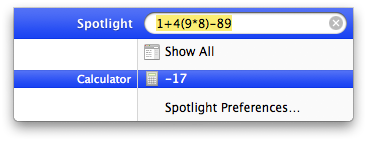
Spotlight can do math on your Macintosh!
